
- Overview
- Different Types of Transcripts
- Where to Find Transcripts & Testimony
- Request a Transcript
- Setting an Alert for Transcripts
Overview
Though CQ transcripts guarantees coverage of almost all congressional hearings and markups as well as major network interviews of policymakers and press briefings, if we ever miss something, head back to the left hand toolbar to request a transcript.
Different Types of Transcripts
CQ guarantees coverage of almost all congressional hearings and markups as well as major network interviews of policymakers and press briefings. Here, we'll break down exactly what kinds of transcripts CQ offers.
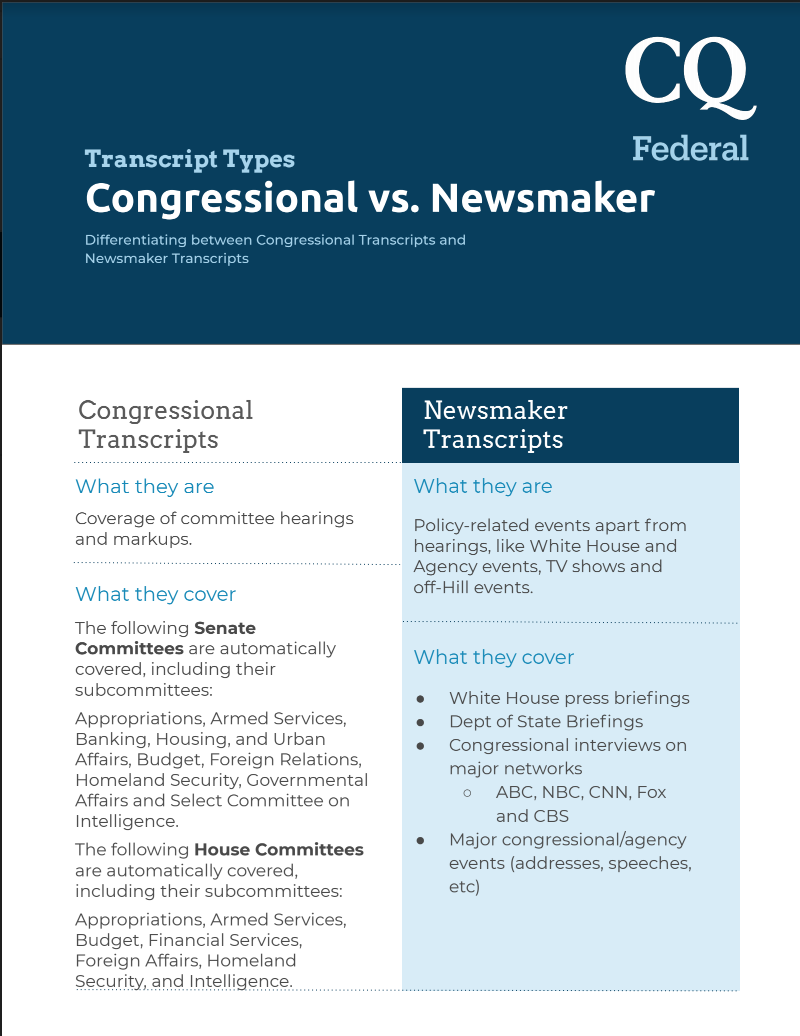
Congressional
CQ delivers gavel-to-gavel coverage of committee and subcommittee hearings with essential, timely transcripts that serve as verbatim records of the Q&A between members of Congress and agency, private sector and interest group witnesses.
The following Senate Committees are automatically covered, including their subcommittees:
Appropriations, Armed Services, Banking, Housing, and Urban Affairs, Budget, Foreign Relations, Homeland Security, Governmental Affairs and Select Committee on Intelligence.
The following House Committees are automatically covered, including their subcommittees:
Appropriations, Armed Services, Budget, Financial Services, Foreign Affairs, Homeland Security, and Intelligence.
The database also offers a full archive dating back to the 104th Congress (1995).
Newsmaker & Regulatory
CQ offers transcripts of speeches, press conferences, news events and agency events with a primary focus on coverage of the president, Congress, and federal agencies.
NOTE: CQ stopped supplying broadcast transcripts since July 1, 2024. Unfortunately, due to low usage, we have stopped providing broadcast transcripts. Our relationship with the information provider and networks has ended.
Newsmaker Transcripts also offers access to word-for-word regulatory coverage focusing on approximately 40 public policy meetings from the DOE, FERC, FCC, FDA, SEC, TSA, HHS, and CFTC.
AI Generated Transcripts
AI-generated transcripts will be available alongside our traditional Proofread transcripts. They are produced by artificial intelligence, meaning they can be ready in as little as 1 hour after the event. With this addition, you'll be able to access full transcripts of all House and Senate Committees (that post publicly available live video coverage of their hearings) within 1 hour of the event's conclusion. To know more about AI-Powered CQ Transcripts, click here.
Where to Find Transcripts & Testimony
Summary Page
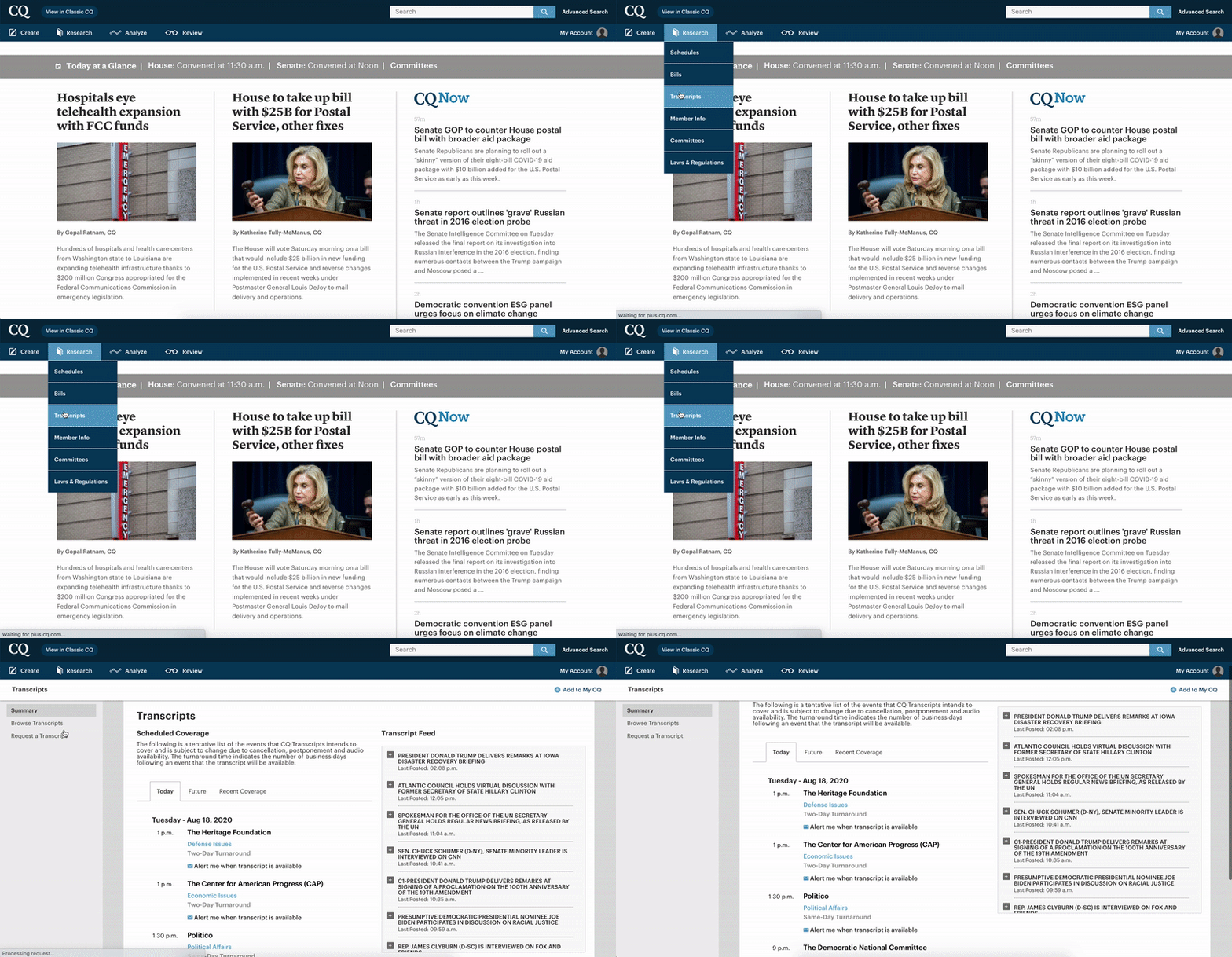
Head to 'Research' → 'Transcripts' to get to the summary page for all transcripts.
Scheduled Coverage
Under the 'Scheduled Coverage' section, you'll find option for transcripts to be posted today;
transcripts slated to be posted in the future, (subject to cancellation),
and transcripts recently posted to the platform.
Bear in mind that all transcripts are guaranteed to be posted within 1-3 days. For AI-generated transcripts, generally they will be available within 1 hour after the event.
Transcript Feed
Transcripts for live events come in as either segmented or complete. Either way, the segments or full transcription are posted as soon as they are available under 'Transcript Feed' with a time stamp for when either the partial or full transcript was posted.
Bear in mind that because the Transcript Feed shows you partial transcripts, which do not get updated as new information is available, CQ recommends that you refer to the 'Scheduled Coverage' section so you only see full, complete transcripts.
Browse Transcripts
If you can't find the transcript you're looking for in the Summary page, head to 'Browse Transcripts.' Here, you'll be able to sort through Congressional transcripts by keyword, committee and date,
and Newsmaker transcripts by keyword, transcript type and date.
Request a Transcript
If, after searching for transcript through the Browse section, you still can't find what you're looking for, you can request a transcript via the 'Request a Transcript' section.
Simply fill in the information listed here and you'll hear from CQ's team shortly thereafter.
Setting an Alert for Transcripts
From the Summary page
As you may have noted, each transcript that has yet to be posted has an option for you to be alerted once that transcript is posted.
By clicking this option, you'll receive an email once the transcript you're interested in is posted to the platform.
If you have any questions, please feel free to contact our CQ Support team:
Email: help@cq.com
Business Hours: 9:00 AM-5:00 PM ET, M-F
Contact number: 866-633-0789
Comments
Please sign in to leave a comment.